Teen Patti Boss Wallet Issue – How to Fix Withdrawal Problems (Complete Guide)
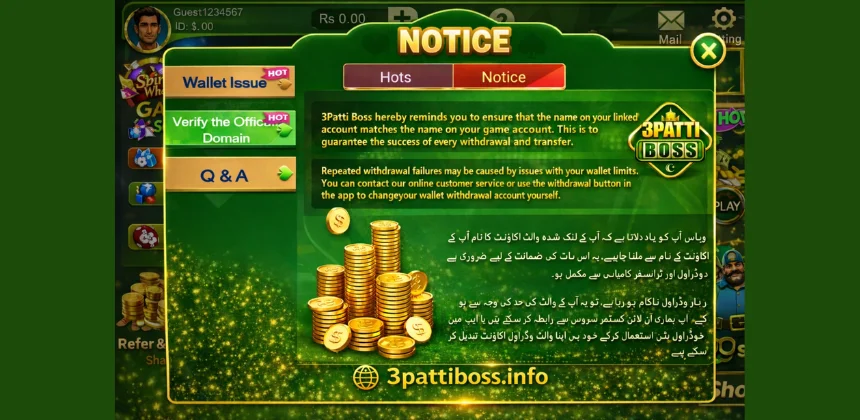
Many players who use the Teen Patti Boss game occasionally face problems when trying to withdraw money from their account. To help users avoid these issues, the platform provides an important notice regarding wallet verification and withdrawal requirements.
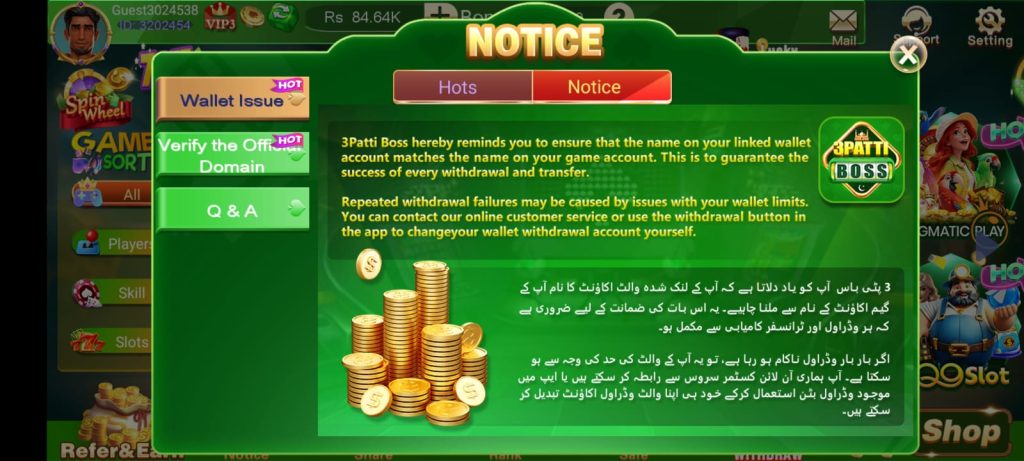
According to the notice shown inside the game, players must ensure that the name on their linked wallet account matches the name on their game account. This step is necessary to guarantee that withdrawals and transfers are processed successfully.
In this guide, we will explain the Teen Patti Boss wallet issue, why withdrawal failures happen, and what steps players can take to fix these problems.
Understanding the Teen Patti Boss Wallet Issue
The wallet issue notice appears in the game to inform players about potential withdrawal problems. The message reminds users that account verification plays an important role in successful transactions.
If the wallet details are incorrect or do not match the game account information, the system may reject the withdrawal request.
The platform uses this verification method to:
Because of this system, players should always check their wallet details before requesting a withdrawal.
Why Withdrawals Fail in 3 Patti Boss Game?
There are several reasons why players may experience withdrawal failures in the 3 Patti Boss Game. Understanding these reasons can help users avoid problems in the future.
Wallet Name Does Not Match Game Account
The most common cause of withdrawal failure is when the wallet account name and the game account name are different.
Even a small difference in spelling can cause the system to reject the transaction. To avoid this issue, players should make sure that both names match exactly.
Wallet Transaction Limits
Another possible reason for withdrawal failure is related to wallet limits.
Mobile wallets such as Easypaisa or JazzCash often have limits on how much money can be transferred within a day or month. If your withdrawal amount exceeds these limits, the transaction may fail.
Checking your wallet limits before requesting a withdrawal can help prevent this problem.
Incorrect Wallet Details
Entering incorrect wallet information is another common reason for failed withdrawals.
If the wallet number or account details are entered incorrectly, the system may not be able to process the transfer.
Always double-check your wallet information before confirming a withdrawal request.
Temporary System Issues
Sometimes withdrawal failures may occur because of temporary technical issues or network problems.
In such situations, players may simply need to wait a short time and try again later.
How to Fix 3 Patti Boss Wallet Issues?
If you are experiencing withdrawal problems, there are several steps you can take to resolve the issue.
Check Your Wallet Name
Make sure the name registered on your mobile wallet account matches the name used in your game account.
If the names do not match, the system may reject the transaction.
Verify Wallet Limits
Check the transaction limits of your mobile wallet. If the withdrawal amount exceeds the allowed limit, try withdrawing a smaller amount.
Update Your Withdrawal Wallet
The notice in the game mentions that players can change their withdrawal wallet account using the withdrawal button inside the app.
Updating your wallet details can help fix problems caused by incorrect account information.
Contact Customer Support
If the issue continues even after checking your wallet details, you can contact the platform’s online customer service for assistance.
The support team may help you identify the exact cause of the problem and guide you on how to fix it.
How to Change Your Withdrawal Wallet in the App?
Changing your withdrawal wallet account inside the game is usually a simple process.
Follow these basic steps:
- Open the 3 Patti Boss game app on your device.
- Log in to your game account.
- Go to the withdrawal section of the app.
- Look for the option to change or update your wallet details.
- Enter the correct wallet information.
- Save the updated details.
After updating your wallet information, future withdrawal requests should work more smoothly.
Tips to Avoid Wallet Issues in the Future
Players can avoid most wallet problems by following some simple precautions.
Use Matching Account Names
Ensure that the name used in the game account is the same as the wallet account name.
Double-Check Wallet Details
Before confirming a withdrawal request, verify that the wallet number and account information are correct.
Monitor Wallet Limits
Be aware of the daily and monthly transaction limits of your mobile wallet.
Keep Your Account Updated
If you change your wallet or phone number, update your details in the game immediately.
FAQs
1. What is the 3 Patti Boss wallet issue?
The 3 Patti Boss wallet issue happens when a withdrawal fails due to incorrect wallet details or a name mismatch.
2. Why does my 3 Patti Boss withdrawal fail?
Withdrawals may fail because of wallet name mismatch, incorrect wallet details, or wallet transaction limits.
3. How can I fix a Teen Patti Boss wallet issue?
Make sure your wallet account name matches your game account name and verify your wallet details before withdrawing.
4. Can I change my withdrawal wallet in 3 Patti Boss?
Yes, you can change your withdrawal wallet account from the withdrawal section inside the app.
5. What should I do if my withdrawal still fails?
If the problem continues, contact the online customer support available in the game.
Final Thoughts
The Teen Patti Boss wallet issue notice is meant to help players avoid common withdrawal problems. Most withdrawal failures happen because of simple issues such as mismatched account names, wallet limits, or incorrect details.
By making sure your wallet information is correct and your account details match, you can significantly increase the chances of successful withdrawals.
Following the guidelines mentioned in the game notice and keeping your wallet details updated will help ensure that your transfers and withdrawals are completed without any problems.